Contrôlez le volume sonore de Windows au clavier Check the volume of Windows keyboard
 Traditionnellement, lorqu'on veut modifier le volume sonore de windows, on doit double-cliquer sur l' icône haut-parleur et régler à la souris le potentiomètre. Traditionally, when wishing to change the volume of windows, one must double-click on the speaker icon and adjust the slider with the mouse.
Or c'est plutôt fastidieux comme approche, notamment quand ça presse (du genre j'attérie sur un site douteux rempli d'effets sonores alors que je suis sensé bosser…). But it is rather tedious as an approach, particularly when it releases (the kind j'attérie on a suspicious site filled with sound effects when I am supposed to work ...).
Pour limiter les dégâts, je vous propose aujourd'hui une astuce qui vous permettra de couper le son de windows en un clin d'oeil grâce à un raccourci clavier . To limit the damage, I am proposing today a trick that allows you to mute the windows in the blink of an eye with a keyboard shortcut.
Pour ce faire, il vous faudra d'abord télécharger un petit utilitaire nommé To do this, you must first download a small utility named tooler Tooler (50kB). (50kB). Vous n'avez pas besoin de l'installer, c'est une You do not need to install it, it is a application portable portable application . .
Exécutez simplement le fichier tooler.exe et remplissez le formulaire de cette façon : Just run the file and complete the form tooler.exe this way:
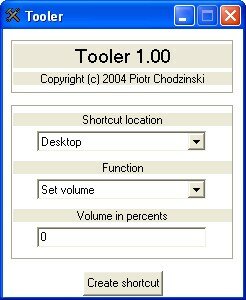
Vous obtiendrez l'icône de raccourci suivante sur le bureau Windows : You will get the following shortcut icon on the Windows desktop:

Faites ensuite un click-droit/propriétés sur cette icône pour lui affecter un raccourci clavier (ici : ctrl+alt+w) : Then do a click-droit/propriétés this icon to assign a keyboard shortcut (here: ctrl + alt + w):
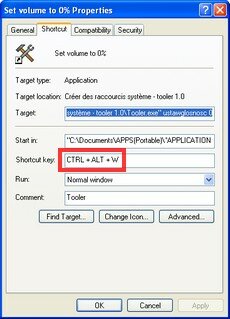
C'est tout, vous pouvez maintenant à tout moment couper le son de votre ordinateur grâce au raccourci ctrl+alt+w. That is, you can now at any moment mute your computer with the shortcut ctrl + alt + w
Vous pouvez ensuite refaire la manoeuvre pour le volume à 100% ou tout autre niveau sonore voulu. You can then repeat the maneuver for the volume to 100% or any listening level.
Quelques remarques Some remarks
- Si vous déplacez le fichier tooler.exe, vous devrez refaire le raccourci. If you move the file tooler.exe, you will have to redo shortcut.
- Le fichier de raccourci doit rester sur votre bureau si vous voulez que le raccourci clavier reste fonctionnel The shortcut file should remain on your desktop if you want the shortcut remains functional
- Tooler permet de créer d'autres raccourcis intéressants, du genre “mise en veille”, “redémarrage” etc… Tooler can create shortcuts to other interesting, like "standby", "reboot" etc. ...
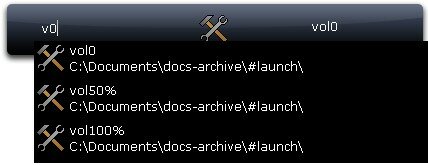
- Cette astuce peut aussi être couplée à un lanceur comme This trick can also be coupled to a pitcher like Launchy Launchy , qui s'occupera d'appeler le fichier de raccourci pour vous : , Who will look to call the shortcut file for you:
Conclusion Conclusion
Grâce à cette astuce, vous avez un moyen simple de couper le son de windows ou de le remettre à un niveau quelconque. With this trick, you have a simple way to mute the windows or deliver on any level.
Je serais curieux de savoir si certains d'entre vous ont des solutions alternatives à ce problème? I am curious to know if some of you have alternative solutions to this problem?

Tags: Tags: application portable portable application , , freeware freeware , , logiciel software , , raccourci clavier Shortcut , , windows windows
Articles similaires (en théorie) : Similar Items (in theory):
Il ya un an sur C'éclair! A year ago on C'éclair! - octobre 2007 - October 2007
Il ya un an sur C'éclair! A year ago on C'éclair! - novembre 2007 - November 2007
Mémo pratique : les raccourcis clavier de Windows Memo practice: keyboard shortcuts in Windows
Folder menu : l'outil d'accessibilité à tout faire Folder menu: the accessibility tool to do everything
Pratique ce mémo! Practice this memo! - Les raccourcis clavier de FreeMind - The keyboard shortcuts for FreeMind


khrys Khrys said, Said,
Wrote on Wrote it octobre 9, 2007 @ 21:38 October 9, 2007 @ 21:38
Une solution pratique c'est d'utiliser les boutons de controles sonore de votre clavier … de nos jours ils sont sur presque tous les claviers A practical solution is to use the buttons on your keyboard sound controls ... today they are on almost all keyboards
Sinon, au travail, j'utilise des ecouteurs. Otherwise, at work, I use headphones. En cas de probleme, rien ne transparait. In case of problems, nothing shines through. Et les petits modeles sont largement suffisants. And smaller models are more than sufficient. Et ca me permet d'ecouter ma musique tranquille. And it allows me to listen to my music alone.
Argancel Argancel said, Said,
Wrote on Wrote it octobre 10, 2007 @ 8:04 October 10, 2007 @ 8:04
@Khrys : très juste, mais perso je n'aime pas trop les écouteurs et j'ai un clavier de portable…. @ Khrys: very fair, but I personally do not like the earphones and I have a laptop keyboard ....
Je me posais plutôt la question sur des solutions alternatives soft… I asked myself the question rather than on alternatives soft ...
khrys Khrys said, Said,
Wrote on Wrote it octobre 10, 2007 @ 12:43 October 10, 2007 @ 12:43
Justement … sur les claviers de portable encore plus que sur les traditionels, les touches de volumes devraient etre presentes (en tout cas j'en ai sur le mien). Exactly ... on portable keyboards even more than the traditional key, the volumes should be presented (at least I have on mine).
Sinon c'est vrai que question confort, les ecouteurs c'est pas toujours ca, mais ca regle d'emblee le probleme. If it's true that issue comfort, the headphones is not always that, but AC rule outset of the problem.
Cote soft, il ya aussi celui-ci : Cote soft, there is also this: http://utilfr42.free.fr/util/Clavier.php?sLang=en http://utilfr42.free.fr/util/Clavier.php?sLang=en et plain d'autres. plain and others.
Note que le probleme ne se pose ni sous Linux (Gnome et KDE proposent des raccourcis, et ceux-ci sont ajustables), ni sous MacOS : tous les claviers Mac sont equipes des touches de controle de volume. Note that the problem arises or Linux (Gnome and KDE provide shortcuts, and they are adjustable), or Mac OS: Mac keyboards are all teams of volume control buttons.
Bonne journee ! Good day!
Argancel Argancel said, Said,
Wrote on Wrote it octobre 10, 2007 @ 14:01 October 10, 2007 @ 14:01
@Khrys : oui mais le miens il n'a pas de potentiomètre…pourtant c'est un Toshiba. @ Khrys: yes but mine did not ... yet potentiometer is a Toshiba.
Sinon clavier+ est plutôt sympa comme programme, mais ce qui me gêne c'est d'installer encore un autre programme en tâche de fond… Otherwise + keyboard is quite nice as a program, but what bothers me is to install yet another program in the background ...
infofiltrage infofiltrage said, Said,
Wrote on Wrote it octobre 12, 2007 @ 23:01 October 12, 2007 @ 23:01
Créer un raccourci sur le bureau. Create a shortcut on the desktop.
Dans Emplacement de l'élément, saisir : The location of the item, enter:
%windir%\system32\sndvol32.exe /t % Windir% \ system32 \ sndvol32.exe / t
Affecter un raccourci (genre ALT + CTRL + M) Assign a shortcut (like ALT + CTRL + M)
Muet ON/OFF : ALT CTRL M, puis M. Mute ON / OFF: CTRL ALT M and M.
C'est geek, non ? This geek, right?

Argancel Argancel said, Said,
Wrote on Wrote it octobre 15, 2007 @ 9:17 October 15, 2007 @ 9:17
@infofiltrage : merci, sympa cette astuce Infofiltrage @: thank you, nice this trick
kinou said, kinou Said,
Wrote on Wrote it mai 27, 2008 @ 12:44 May 27, 2008 @ 12:44
ha oui genial, ca marche nickel le truc de geek de sndvol32.exe, et c'est tout ce qui me fallait. genial ha yes, it works the nickel sndvol32.exe geek stuff, and that's all that I needed. on est en 2008, je viens d'avoir un Dell Desktop tout neuf à mon taf, et son clavier n'a pas de touche multimédia, de plus, les enceintes sont integrées à mon écran, et pour contrôler son volume il faut passer par le menu OSD très compliqué de l'écran (le même pour régler l'image). we are in 2008, I just had a brand new Dell desktop my tif, and keyboard does not have multimedia key, again, the speakers are integrated into my screen and to control its volume must pass through OSD very complicated screen (the same to adjust the image). En plus, ma carte son Realtek remplace le gestionnaire audio de Windows par un logiciel au look très tunning qui m'oblige à chercher l'icône, trouver le bon onglet, puis activer le bon potentiomètre de volume, puis cacher vite cette fenêtre flashy. In addition, my sound card Realtek Audio Manager replaces the Windows software with a look that makes me very tunning search icon, find the right tab and activate the proper volume knob and then quickly hide the window flashy.
Bref, autant dire que pour éviter les surprises au boulot, il me faut réagir vite ! In short, all that to avoid surprises at work, I must respond quickly! Le patron n'est jamais très loin .. The boss is never far .. lol :D. lol: D
Ai donc placé un bel icone de 32×32 en dessous de ma barre des tâches (car j'utilise parallèlement FreeLaunchBar pour avoir tous mes raccourcis dans des menus séparés en bas de l'écran). Have therefore placed a beautiful 32 × 32 icon below my taskbar (because I use parallel FreeLaunchBar for all my shortcuts in separate menus at the bottom of the screen). Cette fois, je ne le raterai plus, ce maudit volume !!! This time, I will not miss more that damned volume!
Ahima said, AHIMA Said,
Wrote on Wrote it juillet 23, 2009 @ 20:15 July 23, 2009 @ 20:15
Le logiciel volkey est pas mal dans le genre: The software is not bad volkey in the genre
“L'interface en français est on ne peut plus simple puisqu'elle consiste uniquement à associer les trois combinaisons de touches pour “Volume +”, “Volume -” et “Muet”.” "The French interface could not be more simple since it consists only involve three key combinations for" Volume + "," Volume - "and" Mute "."
Le liens pour les flemmard => The links for the lazy => http://www.clubic.com/telecharger-fiche10764-volkey.html http://www.clubic.com/telecharger-fiche10764-volkey.html
J'espere que ca conviendra a certains. I hope it has some appropriate.
Ahima AHIMA
Ahima said, AHIMA Said,
Wrote on Wrote it juillet 23, 2009 @ 20:18 23 July 2009 @ 20:18
oups le premier lien avais un probleme de header oops the first link had a problem of header
http://www.01net.com/telecharger/windows/Utilitaire/planificateurs_et_lanceurs/fiches/22344.html http://www.01net.com/telecharger/windows/Utilitaire/planificateurs_et_lanceurs/fiches/22344.html