Sauvegarder et restaurer la position de vos icônes sur le bureau windows Save and restore the position of your icons on the desktop windows
 S'il ya une chose qui m'agace, c'est de devoir ranger à nouveau tous mes icônes après avoir changé la résolution de mon écran. One thing that annoys me is having to re-arrange all my icons after changing resolution of my screen.
C'est maintenant du passé puisque j'ai trouvé une application portable gratuite très pratique qui permet de sauvegarder et restaurer la position des icônes sur le bureau de windows : It is now past since I found a free mobile application that allows convenient to save and restore icon positions on the Windows desktop: DIManager X DIManager X
Je vous ai préparé un petit tutoriel pour commencer à l'utiliser… I've prepared a little tutorial to start using ...
L'installation Installation
- Le logiciel est portable . The software is portable. Si vous lancez l'application avec l'option “-u” il inscrira les informations de configuration dans un fichier sinon il inscrira ces informations dans le registre. If you start the application with the "-u" it will write the configuration information in a file otherwise it will record this information in the registry.
- Pour ceux qui ne parlent pas l'allemand : au début, on vous demandera en allemand si vous acceptez la license d'utilisation, il faut cocher la première case pour dire “oui”. For those who do not speak German at the beginning, you will be asked in German if you accept the license to use, it must first check the box to say "yes". Ensuite, vous pourrez changer la langue en anglais (pas de français, désolé…) Then you can change the language to English (not French, sorry ...)
-
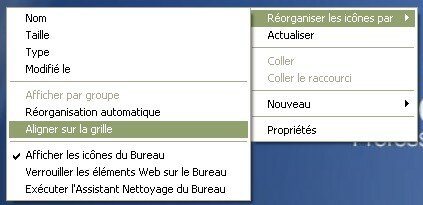
Il faut préalablement désactiver les options “aligner sur la grille” et “réorganisation automatique” en cliquant avec le bouton droit de la souris sur le fond d'écran : It must first disable the option "align to grid" and "Auto Arrange" by clicking the right mouse button on the screen:
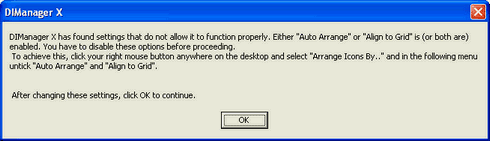
 sinon vous aurez ce message d'alerte au démarrage de DIManager X: if you have this alert message when you start DIManager X
Comment ça marche? How it works?
Voici à quoi ressemble l'écran principal : Looks like the main screen:
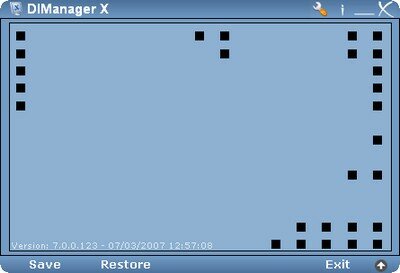
Pour sauvegarder , cliquez sur “Save>Save Standard Profile…” To save, click "Save> Save Standard Profile ..."
Et pour la restauration , cliquez sur “Restore” et selectionnez le profil voulu. And for the restoration, click on "Restore" and select the desired profile.
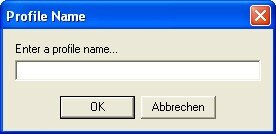
Vous pourrez créer plusieurs profils en allant dans “Save > re-save”. You can create multiple profiles by going to "Save> re-save. Par exemple un profil pour chaque résolution que vous utilisez. For example a profile for each resolution you use. Au passage “abbrechen” veut dire annuler mais vous l'aurez compris… Incidentally "abbrechen" means cancel but you will understand ...
Pour aller plus loin To go further
Le menu de configuration est très bien fait, le voici : The setup menu is very well done, here it is:
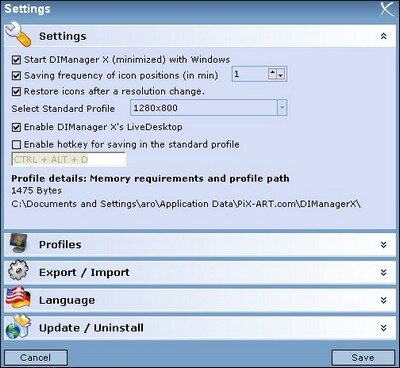
Parmi les options intéressantes : Among the interesting options:
- Démarrer l'application en mode minimisé au démarrage de windows Start the application minimized mode when starting windows
- Sauvegarder toutes les 1 min Save every 1 min
- Restaurer les icônes après un changement de résolution Restoring icons after changing resolution
- Paramétrage d'un raccourci clavier pour sauvegarder manuellement la position des icônes dans le profil par défaut Setting a keyboard shortcut to manually back up the position of icons in the default profile
Remarques Remarks
- Le programme utilise les noms des icônes pour sauvegarder et restaurer leur position, il faut donc sauvegarder après chaque renommage ou bien utiliser l'option de sauvegarde automatique The program uses the names of icons to save and restore their position, we must save after each rename or use the automatic backup
- Version testée : 7.0 Version tested: 7.0
Plus d'infos More info
- Site de l'éditeur Website Editor
- Lien de téléchargement Download link [593 ko] [593 kb]
Voilà c'est tout, vos remarques en commentaire… That's all, your remarks in comment ...
Tags: Tags: icône icon , , position position , , restaurer restore , , sauvegarder save
Articles similaires (en théorie) : Like (in theory):
Il ya un an sur C'éclair! A year ago on this Thread! - juillet 2007 - July 2007
1400 icônes 3D gratuites sous licence libre 1400 free 3D icons licensed free
Comment rendre visibles les 4 icônes les plus utiles de windows? How to make visible the 4 icons most useful windows?
Désactivez le redémarrage automatique de Windows Disable automatic restart Windows
Il ya un an sur C'éclair! A year ago on this Thread! - février 2008 - February 2008








Louglitou said, Louglitou said,
Wrote on Wrote on août 5, 2007 @ 14:53 August 5, 2007 @ 14:53
Bonjour, Hello,
Sous Vista, l'écran de DIManagerX est vide, aucune icône du bureau ne s'affiche ; est-ce “normal” Under Vista, the screen DIManagerX is empty, no desktop icon is not displayed, is it "normal"
Avec mes remerciements et salutations. With my thanks and greetings.
Argancel Argancel said, said,
Wrote on Wrote on août 7, 2007 @ 13:21 August 7, 2007 @ 13:21
@Louglitou : malheureusement je n'ai pas testé ce logiciel sous Vista et sous WinXP je n'ai pas ce problème. @ Louglitou: Unfortunately I have not tested this software with Vista and under WinXP I do not have that problem. Quelqu'un peut aider Louglitou?? Can anyone help Louglitou?
Vladimir said, Vladimir said,
Wrote on Wrote on octobre 13, 2007 @ 16:19 October 13, 2007 @ 16:19
uau, merci, je cherchais ça depuis pas mal de temps et j'ai plus de 100 icones à l'écran.. uau, thank you, I was looking for it for quite some time and have more than 100 icons on the screen ..
AR said, AR said,
Wrote on Wrote on décembre 22, 2008 @ 10:19 December 22, 2008 @ 10:19
J'aimerais bien savoir comment télécharger ce logiciel si beau I wish I knew how to download this software so beautiful
Merci Thank you