Désactivez le redémarrage automatique de Windows Disable automatic restart Windows
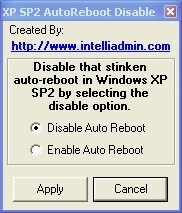 Vous avez dû remarquer que Windows Update a la fâcheuse manie de rebooter automatiquement votre ordinateur dès qu'une mise à jour critique a été téléchargée. You may have noticed that Windows Update has the annoying habit of rebooting your computer automatically when a critical update was downloaded. Vous voyez apparaître alors un compte à rebours durant lequel vous devez sauvegarder tous vos documents. Then you see a countdown during which you must save your documents.
Les développeurs de windows ont sûrement cru bien faire en implémentant cette fonctionnalité. Windows developers have probably thought it best to implement this feature. Mais c'est plutôt gaçant de retrouver sa machine rebootée après l'avoir laissée allumée pendant la pause déjeuner. Gaçant but rather to find the machine reboot after left burning during the lunch break.
Pour remédier à ce problème, il existe un utilitaire : To remedy this problem, there is a utility: Auto Reboot Remover Auto Reboot Remover . . Exécute-le, choissez “Disable Auto Reboot” et validez : c'est tout! Run it, choose "Disable Auto Reboot" and confirm that's all!
source : Source: PC World PC World


