Une astuce pour ouvrir vos fichiers avec le bon programme A trick to open your files with the right program
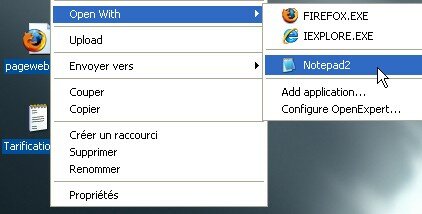
Sous windows, si on veut ouvrir un fichier avec un autre programme que celui qui lui est associé, on utilise le menu Ouvrir avec… Cependant, il arrive souvent que la liste des programmes proposés ne soit pas complète. Under windows, if it wants to open a file with another program that associated with it, use the Open With menu ... However, it often happens that the list of programs offered is not complete. Et c'est plutôt frustrant . And it is rather frustrating.
C'est là qu'intervient Open Expert , un petit utilitaire qui rajoute un menu add application afin d'ajouter rapidement le programme qu'il vous faut. This is where Open Expert, a small utility that adds a menu to add the application to quickly add the program you need. Il vous permettra en outre de proposer par défaut un programme à tout type de fichier. You will also propose a default program for any type of file. Très utile pour les programmes génériques du genre bloc-notes ou éditeur hexadécimal. Very useful for generic programs such notepad or hex editor.
OpenExpert est gratuit pour une utilisation personnelle. OpenExpert is free for personal use. Et vous pourrez le télécharger à l'adresse suivante : And you can download it at: OpenExpert OpenExpert [649Kb] [649Kb]
Si vous connaissez d'autres astuces pour gérer vos extensions de fichiers, laissez un commentaire! If you know other tricks to manage your file extensions, leave a comment!
Tags: Tags: associations Associations , , astuce tip , , extensions de fichier file extensions , , freeware freeware , , gratuit free , , logiciel Software , , open expert open expert , , productivité Productivity , , utilitaire Utility , , windows windows
Articles similaires (en théorie) : Like (in theory):
Il ya un an sur C'éclair! A year ago on this Thread! - janvier 2008 - January 2008
Comment voir la taille des dossiers dans l'Explorateur Windows? How to see the size of folders in Windows Explorer?
Localisez graphiquement les fichiers qui surchargent votre disque dur Locate the graphic files that overload your hard drive
Il ya un an sur C'éclair! A year ago on this Thread! - novembre 2007 - November 2007
Comment extraire les fichiers contenus dans un fichier d'installation? How to extract the files into an installation file?






Lorelei said, Lorelei said,
Wrote on Wrote on janvier 22, 2008 @ 19:14 January 22, 2008 @ 19:14
Une petite astuce qui ne nécessite pas de logiciel : il suffit de copier les raccourcis des applications dans le dossier “C:\Documents and Settings\\SendTo”. A little trick that requires no software: just copy the application shortcuts in the folder C: \ Documents and Settings \ \ SendTo ". A noter qu'il s'agit d'un dossier caché. Note that this is a hidden folder. Au moment d'ouvrir le fichier, il suffira d'aller dans le menu “Envoyer vers” et de choisir l'application. When opening the file, simply go into the menu "Send To" and choose the application. Raccourci indispensable (je dirais presque obligatoire !) : le bloc-notes bien sûr ! Shortcut needed (I say almost mandatory!): The notebook of course!
Lorelei said, Lorelei said,
Wrote on Wrote on janvier 22, 2008 @ 19:17 January 22, 2008 @ 19:17
Arg il faut bien sûr lire : “C:\Documents and Settings\Utilisateur\SendTo” Arg must of course read: "C: \ Documents and Settings \ User \ SendTo"
Le blog n'a pas aimé que je mette “Utilisateur” entre “”… The blog does not like me to put "User" between "...
Didier Bretin Didier Bretin said, said,
Wrote on Wrote on janvier 23, 2008 @ 11:53 January 23, 2008 @ 11:53
J'ai souvent besoin d'ouvrir un fichier avec Vim et ceci quelque soit l'extension du fichier. I often need to open a file with Vim and this whatever the file extension. J'ai donc fait un script pour autohotkey qui quand je suis dans un explorateur de fichiers et que je presse F12, le fichier est ouvert avec vim. So I made a script for AutoHotkey that when I'm in a file browser and I press F12, the file is opened with vim. Voici le script correspondant: Here is the corresponding script:
; ;
; open with vim ; Open with vim
; ;
F12:: F12:
IfWinActive, ahk_class CabinetWClass IfWinActive, ahk_class CabinetWClass
{ (
Send, {F2}^c{ESC} Send, (F2) ^ c (ESC)
name := Clipboard name: = Clipboard
Send, !d^c Send,! D ^ c
dir := Clipboard dir: = Clipboard
Send, {TAB} Send, (TAB)
Run, “C:\Program Files\Vim\vim71\gvim.exe” “%dir%\%name%” Run "C: \ Program Files \ Vim \ vim71 \ gvim.exe" "% dir% \% name%"
} )
return return
Argancel Argancel said, said,
Wrote on Wrote on janvier 24, 2008 @ 10:51 January 24, 2008 @ 10:51
@Lorelei : oui c'est vrai qu'on peut utiliser “Send To” ou “Envoyer vers” pour les windows en français. @ Lorelei: Yes it's true that we may use "Send To" or "send to" windows to the French. Je n'avais pas pensé à utiliser ce menu pour ça. I had not thought about using this menu for that.
@Didier Bretin : merci pour le code, ça peut fonctionner aussi pour les autres éditeur que Vim. @ Didier Bretin: thank you for the code, it can also work for other editor Vim.