Gagnez du temps grâce à la substitution de texte en cours de frappe Save time by substitution text as you type
 Au quotidien, il arrive souvent de taper plusieurs fois la même chose : une signature d'email, une adresse personnelle, une formule de politesse, un numéro d'identification à rallonge, etc. Daily, often several times to type the same thing: an email signature, a personal address, a salutation, an identification number to extension, etc..
Pour économiser ce temps perdu, le logiciel Texter vous propose de mémoriser ces bouts de texte et de vous les ressortir quand vous en avez besoin en tapant simplement l'abbréviation correspondante. To save the lost time, the software offers Texter store these bits of text and get them out when you need it simply by typing the corresponding abbreviation.
Cet article va vous faire découvrir la puissance de ce petit logiciel gratuit … This article will help you discover the power of this free software ...
Installation Installation
A vrai dire, vous n'aurez pas besoin d'installer Texter , il vous suffira de télécharger la Actually, you do not need to install Texter, you can simply download the version portable portable version et de l'exécuter. and run. Texter se logera ensuite en mémoire et vous y aurez accès grâce à son icône dans la barre des tâches : Texter will lodge itself in memory and then you will have access through an icon in the taskbar:

Cliquez simplement dessus avec le bouton droit de la souris pour accéder aux options : Simply click the right button of the mouse to access the options:
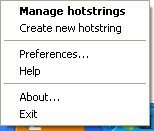
Vous utilisez surtout ces 3 menus : You mainly use the 3 menus:
- Manage hotstrings : accès au paramétrage des abbréviations Manage hotstrings: access to the settings of abbreviations
- Create new hotstring : pour créer une nouvelle abbréviation Create new hotstring: to create a new abbreviation
- Preferences… : pour configurer Texter Preferences ...: configure Texter
Comment ça marche? How it works?
La première chose à faire est de saisir une abbréviation. The first thing to do is type an abbreviation. Pour cela, vous pouvez utiliser le raccourci Ctrl+Maj+H ou cliquer simplement sur Create new hotstring . For this you can use the shortcut Ctrl + Shift + H or simply click on Create new hotstring.
L'écran de saisie apparaît : The input screen appears:
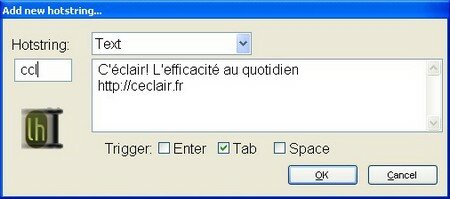
Ici, j'ai saisi l'abbréviation ccl , qui sera substituée par C'éclair! Here, I took the abbreviation ccl, which will be replaced by Thread! L'efficacité au quotidien<entrée>https://ce-clair.fr Effective daily <enter> https://ce-clair.fr
Le déclencheur sera la touche tab, mais j'aurais pu choisir l'espace ou la touche entrée. The trigger will be the tab key, but I could choose the space or the enter key.
Donc maintenant si dans n'importe quel programme je tape ccl suivi de la touche<tab>, mon ccl sera immédiatement remplacé par la subsitution que j'ai paramétrée. So now if in any program I type ccl followed by TAB, my ccl be immediately replaced by the substitu that I set.
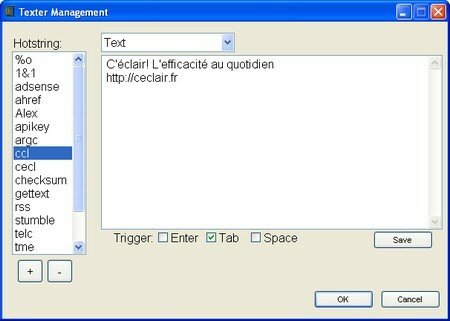
Le principe est donc de bâtir votre librairie d'abbréviations utiles pour soulager votre frappe au clavier. The principle is to build your library of useful abbreviations to ease your typing. Et vous pourrez gérer tout cela par le menu Manage hotstrings : And you can manage all this by the Manage menu hotstrings:
Utilisation de variables Using Variables
En utilisant des variables, vous pourrez obtenir des substitution un peu plus intelligentes. Using variables, you can get a little alternative smarter. Voici les plus utiles : Here are the most useful:
- %c : insère le contenu du presse-papier % c: inserts the contents of the clipboard
- %| : indique l'emplacement où doit se positionner le curseur une fois l'abbréviation terminée % |: Indicates the location needs to position the cursor after the abbreviation completed
- %ds : insère la date au format court comme ceci : 3/9/2007 % ds: inserts the date in short format like this: 3/9/2007
- %dl : insère la date au format long comme ceci : Friday, March 09, 2007 % dl: inserts the date in long format like this: Friday, March 09, 2007
- %t : insère l'heure courante comme ceci : 1:30PM % q: insert the current time as follows: 1:30 PM
L'exemple le plus courant est le code HTML pour un lien : The most common example is the HTML for a link:
<a href=”%c”>%|</a> <a href="%c">% | </ a>
Ici le contenu du presse papier sera collé en guise d'adresse et le curseur se positionnera entre les deux balises pour que vous puissiez saisir le texte du lien. Here the contents of the clipboard will be pasted as an address and the cursor is positioned between two tags that you can enter the link text.
Utilisation de scripts Using scripts
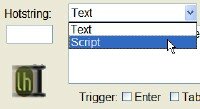
En mode script, vous pourrez indiquer à Texter de simuler certaines touches du clavier. In script mode, you can tell Texter simulate certain keys. Par exemple, vous pourriez vouloir automatiser la saisie dans un formulaire de votre nom et prénom : For example, you might want to automate the entry form in your name:
Duchemin{tab} Jaques {enter} Duchemin Jaques (tab) (enter)
Ceci est un exemple simple mais on peut imaginer des choses plus complexes. This is a simple example but we can imagine things more complex. Voici une vidéo de Here's a video lifehacker lifehacker , où le script permet d'insérer une signature d'email qui va automatiquement copier coller le nom du destinataire dans les remerciements : Where the script to insert an email signature that will automatically copy and paste the recipient's name in the acknowledgments:
Ci-dessous : le code utilisé dans la vidéo : Below the code used in the video:
+{Tab}^{Home}^+{Right}^c{Tab}{BS}Thanks for the email, ^v{BS}. + (Tab) ^ (Home) ^ + (Right) ^ c (Tab) (BS) Thanks for the email, ^ v (BS).
Et voici les principales touches utilisables pour vos scripts : And here are the main keys used for your scripts:
{BS} : backspace (BS) Backspace
{Tab} : Tab (TAB) TAB
{Enter} : Entrée (Enter): Entry
{Left}{Right}{Up}{Down} : Gauche, Droite, Haut, Bas (Left) (Right) (Up) (Down): Left, Right, Up, Down
+ : Maj +: Shift
^ : Contrôle ^: Control
# : touche Windows #: Windows key
! : Alt !: Alt
Exemples d'utilisation Examples of use
- Signature d'emails Signing emails
C'est l'utilisation la plus courante. It is the most common use. Vous pourrez ainsi obtenir la même signature d'email sous divers logiciels de messagerie. You'll be able to get the same email signature in various email programs.
- Votre adresse Sender
Si vous avez une adresse à rallonge, Texter vous permettra de facilement l'insérer dans n'importe quel logiciel. If you have an address extension, Texter allows you to easily insert into any program.
- Modèles d'emails Email Template
Il est parfois utile d'utiliser des modèles d'emails pour éviter de passer trop de temps à trouver les bonnes formules pour démarcher des clients, écrire une lettre de motivation, répondre à un client, etc. It is sometimes useful to use models of emails to avoid spending too much time to find the right formulas for soliciting customers, write a letter, responding to a customer, etc..
- Saisie simplifiée de caractères spéciaux Simplified entry of special characters
Normalement, pour saisir un caractère spécial, il faut taper alt + le code du caractère au clavier numérique. Normally, to enter a special character, it must hit alt + the character code at the keypad. Ceci peut être assez agaçant, surtout si vous utilisez un ordinateur portable. This can be quite annoying, especially if you use a laptop. Personnellement, j'utilise souvent le caractère ‰. Personally, I often use the character ‰. J'ai donc paramétré l'abréviation %o - un % et un o - qui est substituée automatiquement par le caractère ‰. So I set the abbreviation% o - a% o and - which is automatically replaced by the character ‰.
- Correcteur automatique Automatic correction
Il arrive souvent de faire les mêmes erreurs de frappe. Often making the same typos. Par exemple taper uen au lieu de une , ce qui ne veux pourtant rien dire. For example type uen instead of one, which does not want to say anything yet. Paramétrer une abbréviation uen substituée par une peut alors vous servir de correcteur automatique. Setting an abbreviation uen substituted by one then you can use automatic correction.
- Date du jour / heure Current date / time
Il peut être utile d'identifier des notes saisies dans un fichier texte grâce à la date et l'heure où elles ont été saisies. It may be useful to identify marks entered in a text file with the date and time when they were seized. Vous pourrez donc paramétrer une abbréviation qui les insère automatiquement. You can then set an abbreviation which automatically inserts.
- Saisie rapide de formulaires Quick Entry Form
Il peut être économique de créer un script pour saisir automatiquement certains champs d'un formulaire. It may be economical to create a script to automatically enter certain fields of a form. Personnellement, j'en ai paramétré un pour préremplir une partie des champs d'un formulaire qui me sert à entrer des fiches de liaison chez un prestataire de service. Personally, I set one to prefill some fields on a form that I used to enter records from a liaison service provider.
- Mémos Memos
Il peut être utile de stocker ses mémos dans Texter. It may be useful to store in his memos Texter. Par exemple un numéro de client, une clé d'identification, etc. For example a customer number, an identification key, etc.. On en a souvent besoin de les taper sur le net. We often need to tap the Net.
- Librairie de bouts de code Library code snippets
On a vu qu'on peut utiliser avantageusement Texter pour le code HTML, mais on peut aussi l'utiliser pour d'autres langages, par exemple pour des requêtes SQL complexes. We have seen that can be used advantageously Texter to HTML, but you can also use it for other languages, eg for complex SQL queries.
Conclusion Conclusion
Texter fait partie de ces logiciels qui n'ont l'air de rien mais rendent l'utilisation quotidienne d'un ordinateur plus agréable. Texter is one of those software that seem to nothing but make the daily use of a computer more pleasant. C'est à la fois une manière de taper plus efficacement mais aussi un aide mémoire très utile. It is both a way to type more efficiently but also a very useful checklist.
Au delà de ses fonctionnalités, Texter possède aussi beaucoup d'atouts par rapport aux logiciels concurrents : il est gratuit, open source, simple d'utilisation, léger, stable. Beyond its functionality, Texter also has many advantages over competing software: it is free, open source, easy to use, lightweight, stable. Et la version portable vous permettra de l'emporter avec vous afin de l'exécuter à partir d'une clé USB sur n'importe quel ordinateur. And the portable version lets you take it with you to run from a USB drive on any computer.
Je vous le conseille donc vivement. I advise you all very much.
Plus d'infos More info
Page de l'éditeur : Page Editor: Lifehacker code : Texter Lifehacker Code: Texter
Equivalents Mac : TextMate, TextExpander, TypeIt4Me Alternatives Mac: TextMate, TextExpander, TypeIt4Me
Equivalents Windows : Windows Alternatives: PhraseExpress PhraseExpress , , ShortKeys ShortKeys , , Activewords Activewords , , AutoHotKey AutoHotKey
Vous pouvez maintenant partager vos réactions dans les commentaires… You can share your reactions in the comments ...
Tags: Tags: efficacité efficiency , , freeware freeware , , portable application mobile application , , substitution substitution , , texter texter
Articles similaires (en théorie) : Like (in theory):
Il ya un an sur C'éclair! A year ago on this Thread! - août 2007 - August 2007
AutoHotKey : contrôlez Windows grâce à vos propres raccourcis clavier AutoHotKey: control Windows with your own keyboard shortcuts
Neo's SafeKeys : pour contrer les enregistreurs de frappe Neo's SafeKeys: to fight keyloggers
Un outil de dépannage gratuit pour comparer des listes Excel A free troubleshooting tool for comparing Excel lists
Il ya un an sur C'éclair! A year ago on this Thread! - juin 2008 - June 2008






Lucjo said, Lucjo said,
Wrote on Wrote on septembre 8, 2007 @ 20:25 September 8, 2007 @ 20:25
J'ai utilisé PhraseExpress (aussi gratuit, mais non libre) quelques semaines. I used PhraseExpress (also free but not free) a few weeks. Puis j'ai réalisé une chose : ces outils sont de formidables “Keyloggers”. Then I realized something: these tools are fantastic "Keyloggers". Puis la question qui tue : Et si ……. Then the killer question: What if ... ....
“Adieu veau, vache, cochon, couvée, finis les beaux rêves”, car quelqu'un, quelque part, a piqué des infos confidentielles (mot de passe, no de carte de crédit,…) "Farewell calf, cow, pig, clutch, no more dreams, because someone, somewhere, has piqued the confidential information (passwords, no credit card ...)
Bien sûr, un logiciel OpenSource, c'est mieux. Of course, an open source software is better. Bien sûr un firewall bien configuré fera reste. Of course a properly configured firewall will remain. Mais un “Keylogger” reste un “Keylogger”. But a "keylogger" is a "keylogger". À chacun d'en connaître les risques potentiels et de faire des choix éclairés. For everyone to know the potential risks and make informed choices.
Pour moi, j'ai désinstallé PraseExpress For me, I uninstalled PraseExpress
Argancel Argancel said, said,
Wrote on Wrote on septembre 10, 2007 @ 15:28 September 10, 2007 @ 15:28
@Lucjo : @ Lucjo:
Bonne remarque, mais je pense que les chaînes de caractères enregistrées restent en mémoire vive de l'ordinateur dans une mémoire tampon limitée à un certain nombre de caractères. Good point, but I think the strings are stored in RAM in the computer memory buffer to a limited number of characters.
Didier Bretin Didier Bretin said, said,
Wrote on Wrote on décembre 5, 2007 @ 14:48 December 5, 2007 @ 14:48
Adam Pash qui a fait cet utilitaire en a fait un autre très pratique également: Swept Away Adam Pash who made this utility has made another handy also: Swept Away http://lifehacker.com/software/downloads/lifehacker-code-swept-away-windows-255055.php http://lifehacker.com/software/downloads/lifehacker-code-swept-away-windows-255055.php qui permet de faire disparaitre automatiquement au bout d'un certain temps les fenêtres sur lesquelles vous n'avez pas travaillé depuis un petit moment. which allows to automatically disappear after a certain time windows on which you have not worked for a while. Je le trouve extrèmement pratique car il me permet d'avoir toujours un environnement sain pour travailler. I find it extremely convenient because it allows me to always have a healthy environment for work.
Argancel Argancel said, said,
Wrote on Wrote on décembre 5, 2007 @ 15:36 December 5, 2007 @ 15:36
@Didier Bretin : très juste. @ Didier Bretin: very fair. Je l'avais essayé il fût un temps, mais il m'avait agacé à force parcequ'il me fermait des fenêtre que je ne voulais pas fermer. I had tried it was a time, but it annoyed me because he forces me to shut the window that I did not close. J'aurais peut-etre pu essayer de mieux le paramétrer mais je n'ai pas cherché plus loin. Perhaps I could try to better set but I did not look further.
Merci pour le tuyau. Thank you for the tip.