Génialissime : manipulez efficacement vos fenêtres avec NiftyWindows Génialissime: effectively handle your windows NiftyWindows

Avec NiftyWindows , manipuler les fenêtres de Windows devient un vrai plaisir. With NiftyWindows, manipulate windows Windows becomes a real pleasure.
C'est un petit logiciel gratuit qui s'exécute en tâche de fond et vous permet de contrôler la plupart des propriétés de vos fenêtres : taille, transparence, attribut “always on top”, etc. This is a free software that runs in background and enables you to control most of the properties of your window size, transparency, an attribute "always on top", etc.. On utilise pour cela la souris et quelques touches du clavier judicieusement choisies. This is done using the mouse and keyboard a few judiciously chosen.
Ecrit avec le langage de scripts AutoHotKey dont nous Written with the AutoHotKey scripting language we parlions récemment spoke recently , il est également assez facile de l'adapter à vos besoins. It is also quite easy to fit your needs.
Voici une petite introduction… Here's a little introduction ...
Commençons par la fonctionnalité la plus puissante : Start with the most powerful feature:
Déplacement/redimensionnement des fenêtres Move / resize windows
Pour bien comprendre cette fonctionnalité, il faut imaginer une grille sur votre fenêtre : To understand this feature, you must imagine a grid on your window:
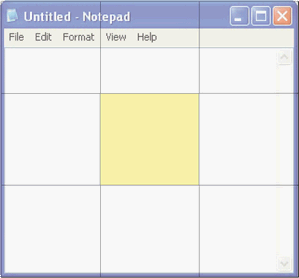
Selon l'endroit où vous cliquerez dans cette grille, vous allez pouvoir manipuler la fenêtre de diverses manières. Depending on where you click in the grid, you will be able to manipulate windows in various ways.
Tout d'abord, pour déplacer la fenêtre , il suffit de cliquer avec le bouton droit de la souris dans la zone jaune tout en la faisant glisser. Firstly, to move the window, just click the right button of the mouse in the yellow zone while dragging. Un libellé apparaît alors pendant l'opération pour indiquer les coordonnées du coin supérieur gauche de votre fenêtre : A label will appear during the operation to indicate the coordinates of upper left corner of your window:
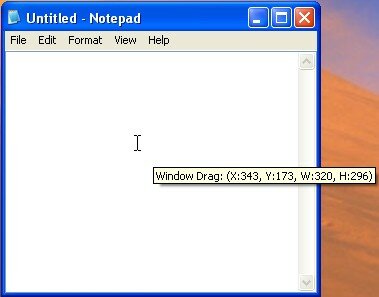
Notez que si votre fenêtre est maximisée, il vous faudra enfoncer en même temps la touche contrôle pour le déplacement. Note that if your window is maximized, you will simultaneously press the control key for moving.
Si vous souhaitez redimensionner , il suffira d'utiliser une des 8 autres cases. If you want to resize, just use one of 8 other cases.
Le redimensionnement affectera le côté où vous cliquez. The downsizing will affect the side where you click. Par exemple : For example:
- Si on clique sur le côté droit, ce sera le bord droit de la fenêtre que vous contrôlerez. If you click on the right side, this is the right edge of the window that you control.
- Si on clique le coin supérieur gauche, ce sera ce coin qu'on va manipuler. If you click the upper left corner that will be this we will handle.
Changer l'attribut “Always on top” d'une fenêtre Change the attribute "Always on top" of a window
Sous windows, il n'existe pas de moyen simple pour maintenir une fenêtre en permanence au-dessus des autres fenêtres, à moins que ce ne soit prévu dans le logiciel que vous utilisez. Under windows, there is no simple way to keep a window always on top of other windows, unless this is provided in the software you use.
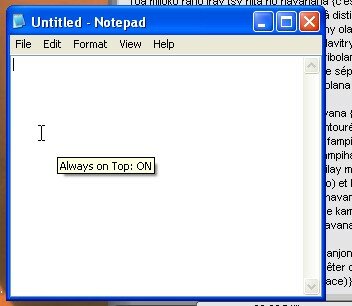
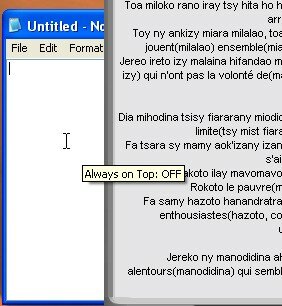
Avec NiftyWindows , rien de plus simple, il suffit de cliquer dans la fenêtre avec le bouton gauche de la souris tout en maintenant la touche windows enfoncée. With NiftyWindows, nothing more simple, just click in the window with the left button of the mouse while pressing the windows key.
Voici le résultat : Here are the results:
Activation de l'attribut always on top : Enabling attribute always on top:
Désactivation de l'attribut always on top : Disable attribute always on top:
Basculez entre vos fenêtres à la souris Switch between windows with the mouse
Si vous avez une souris à molette, vous pourrez aisément basculer entre vos fenêtre en faisant rouler la molette tandis que vous maintenez le bouton droit de la souris enfoncé : If you have a wheel mouse, you can easily switch between your windows by rolling the wheel while you hold down the right mouse button:
Coupez le son avec la touche pause Mute with the pause button
Avec NiftyWindows , vous pouvez désactiver/réactiver le son de votre ordinateur à volonté grâce à la touche pause : With NiftyWindows, you can mute / unmute your computer at will using the pause button:

Enrouler/dérouler/minimiser une fenêtre Retraction / minimize a window
Encore une fonctionnalité très sympatique que vous obtiendrez en cliquant en même temps sur le bouton gauche et le bouton droit de la souris dans la fenêtre voulue : Another very nice feature you get by clicking along the left button and right button of the mouse in the desired:
- cliquez sur le corps de la fenêtre et elle se minimisera click on the body of the window and it will minimize
-
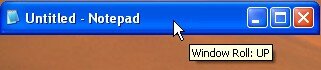
cliquez sur la barre de titre et elle s'enroulera / se déroulera à volonté :Enroulée : click the title bar and furl / will be held at: Wrapped:
 Déroulée : Place:
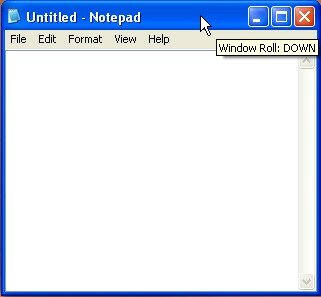
Remarque : il est conseillé d'enfoncer le bouton droit avant le bouton gauche pour éviter toute mauvaise manipulation. Note: It is advisable to press the button right before the left button to avoid mishandling.
Régler la transparence d'une fenêtre Adjust the transparency of a window
Pour contrôler la transparence d'une fenêtre, il suffit de faire rouler la molette de votre souris tandis que vous maintenez la touche windows enfoncée : To control the transparency of a window, simply roll the scroll wheel on your mouse while you hold the windows key:
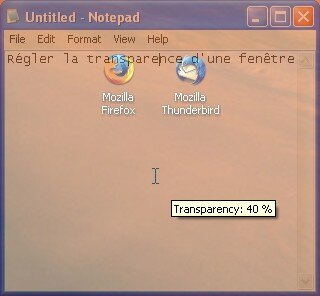
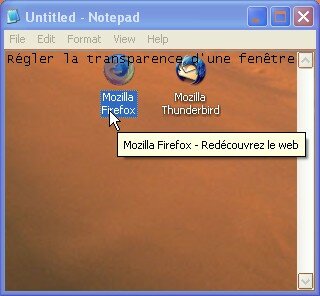
Dans le même style, vous pouvez aussi rendre transparents tous les pixels d'une même couleur dans une fenêtre. In the same style, you can also make transparent all pixels of the same color in a window. Il sera ainsi possible de cliquer à travers. This will make it possible to click through. Pour cela utilisez le raccourci <ctrl>-<Windows>-<clic gauche> sur la fenêtre voulue : To use this shortcut <ctrl> - <Windows> - left mouse click on the desired window:
Quelques recommandations Some recommendations
En cas de mauvaise manipulation avec NiftyWindows, il est bon de connaître le raccourci qui annule tous les effets graphiques : <Ctrl>-<Windows>-<Backspace> If they screw with NiftyWindows, it is good to know the shortcut that cancels all the graphic effects: <Ctrl> - <Windows> - <BackSpace>
Vous pourrez aussi désactiver/réactiver les raccourcis de Nifty Windows à l'aide du raccouci <Windows>-<Echap> You can also deactivate / reactivate the Nifty Windows shortcuts using the shortcut <Windows> - <Esc>
Vous êtes conquis? You won?
Prêt à donner un coup de fouet à l'ergonomie de vos fenêtre? Ready to give a boost to the ergonomics of your window? Il ne vous reste qu'à télécharger NiftyWindows sur le You just have to download the NiftyWindows site de l'éditeur Site Editor . . Pour ne rien gâcher, ce logiciel est open-source , To avoid spoiling anything, this software is open source, portable Mobile et gratuit . free.
Vous trouverez un catalogue complet des raccourcis disponibles dans le fichier features.pdf livré avec le logiciel. You will find a complete catalog of available shortcuts in the file features.pdf comes with the software.
Sur ce vous pouvez maintenant partager vos impressions dans les commentaires… On it you can share your impressions in comments ...
Tags: Tags: accessibilité Accessibility , , always on top always on top , , astuce tip , , autohotkey AutoHotkey , , déplacer move , , ergonomie Ergonomics , , fenêtre window , , gratuit free , , logiciel Software , , portable application mobile application , , productivité Productivity , , raccourcis clavier keyboard shortcuts , , redimensionner resize , , rolldown rolldown , , rollup Rollup , , windows windows
Articles similaires (en théorie) : Like (in theory):
Il ya un an sur C'éclair! A year ago on this Thread! - décembre 2007 - December 2007
Comment déplacer une fenêtre qui dépasse de l'écran sous Windows? How to move a window over the screen in Windows?
Mémo pratique : les raccourcis clavier de Windows Memo practice: the keyboard shortcuts in Windows
Kit productivité C'éclair! Productivity Kit Thread! : retour d'expérience sur 38 logiciels après 1 an de veille : Feedback on 38 software after 1 year eve
Astuce éclair : accédez instantanément aux dossiers fréquemment utilisés Flash Tip: get instant access to frequently used folders








burningHat burningHat said, said,
Wrote on Wrote on décembre 7, 2007 @ 12:15 December 7, 2007 @ 12:15
Tiens, ça ressemble à s'y méprendre à la plupart des fonctionnalités de manipulation de fenêtres d'un serveur X (+compiz-fusion pour la transparence) natives sous Linux (même le raccourci pour “tuer” les effets y ressemble: CTRL + Win + Backspace avec ton programme, CTRL + ALT + Backspace pour relancer X) Well, it looks like most of the functionality of handling windows X server (+ compiz-fusion for transparency) native Linux (even the shortcut to "kill" the effects it looks like: CTRL + Win + Backspace with your program, CTRL + ALT + Backspace to restart X)
Argancel Argancel said, said,
Wrote on Wrote on décembre 7, 2007 @ 12:26 December 7, 2007 @ 12:26
@burningHat : ah oui? @ burningHat ah yes? ils ont eu une bonne source d'inspiration alors! they had a good source of inspiration then!
vinc[E] vinc [E] said, said,
Wrote on Wrote on décembre 7, 2007 @ 14:40 December 7, 2007 @ 14:40
Ce logiciel est génialissimme :o) , merci pour l'info ! This software is génialissimme: o) thank you for the info!