Save time thanks to the substitution of text in the course of striking
 At the daily newspaper, it often sometimes happens to type several times the same thing: a signature of email, an personal address, a complimentary close, an identification number to extension, etc
To save this wasted time, the Texter software proposes to you to memorize these ends of text and you them to arise when you need some by typing the corresponding abbreviation simply.
This article will make you discover the power of this small free software
Installation
To tell the truth, you will not need to install Texter, it will be enough for you to download the portable version and to carry out it. Texter will be placed then in memory and will have there you access thanks to his icon in the bar of the tasks:

Click simply above with the right button of the mouse to reach the options:
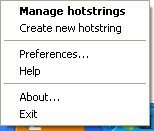
You use especially these 3 menus:
- Manage hotstrings: access to the parameter setting of the abbr�viations
- Create new hotstring: to create a new abbreviation
- Preferences: to configure Texter
How does it go?
The first thing to be made is to seize a abbreviation. For that, you can use the Ctrl+Maj+H short cut or click simply on Create new hotstring.
The data entry screen appears:
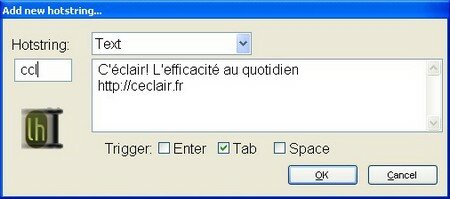
Here, I seized the abbreviation ccl, which will be substituted by It flash! Effectiveness with the quotidien<entr�e> https://ce-clair.fr
The release will be the key, but I could have chosen space or the entered key.
Thus now so in any program I type ccl followed touche<tab>, my ccl will be immediately replaced by the subsitution which I parameterized.
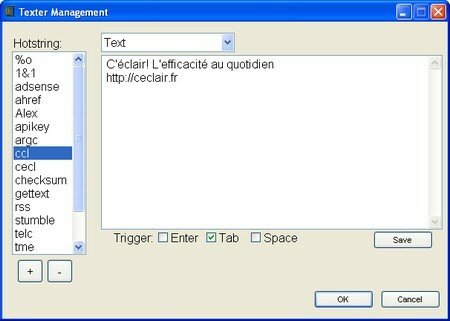
The principle is thus to build your bookshop of useful abbr�viations to relieve your striking with the keyboard. And you will be able to manage all that by the menu Manage hotstrings:
Use of variables
By using variables, you will be able to obtain substitution a little more intelligent. Here most useful:
- %c: insert the contents of the clipboard
- %| : indicate the site where must position the cursor once the finished abbreviation
- %ds: insert the date into the format runs like this: 3/9/2007
- %dl: insert the date into the long format like this: Friday, March 09,2007
- %t: insert the current hour like this: 1:30 PM
The example more the current is code HTML for a bond:
<a href= %c >%|</a>
Here the contents of the clipboard will be stuck as an address and the cursor will position between the two beacons so that you can access the text of the bond.
Use of scripts
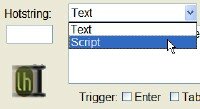
In script mode, you will be able to indicate to Texter to simulate certain keys of the keyboard. For example, you could want to automate the seizure in a form of your name and first name:
Duchemin {} Jaques {enter}
This is a simple example but one can imagine more complex things. Here a video of lifehacker, where script makes it possible to insert a signature of email which automatically will copy to stick the name of the recipient in the thanks:
Below: the code used in the video:
+ {} ^ {Home} ^+ {Right} ^c {} {BS} Thanks for the email, ^v {BS}.
And here principal keys usable for your scripts:
{BS}: backspace
{}:
{Enter}: Entry
{Left} {Right} {Up} {Down}: Left, Right-hand side, High, Low
+: Maj
^: Control
#: touch Windows
! : Alt
Examples of use
- Signature of emails
It is the most current use. You will be able to thus obtain the same signature of email under various messaging software.
- Your address
If you have an address with extension, Texter will enable you easily to insert it in any software.
- Models of emails
It is sometimes useful to use models of emails to avoid spending too much time to find the right formulas to canvass customers, to write a covering letter, to answer a customer, etc
- Simplified seizure of special characters
Normally, to seize a special character, alt should be typed + the code of the character to the digital keyboard. This can be enough aggravating, especially if you use a laptop. Personally, I often use the character . I thus parameterized the abbreviation %o - % and an O - which is substituted automatically by the character .
- Automatic corrector
It often sometimes happens to make the same typing errors. For example to type uen instead of one, which want nothing to however say. To parameterize a abbreviation uen substituted by one can then be used to you as automatic corrector.
- Hour/current date
He can be useful to identify notes seized in a textual file thanks to the date and the hour when they were seized. You will be able to thus parameterize a abbreviation which inserts them automatically.
- Fast seizure of forms
He can be economic to create a script to seize automatically certain fields of a form. Personally, I parameterized some to pr�remplir part of the fields of a form which is used to me to enter of the cards of connection at a service provider.
- Memos
He can be useful to store his memos in Texter. For example a number of customer, a key of identification, etc One needs some often to type them on the Net.
- Bookshop of ends of code
It was seen that one can use advantageously Texter for code HTML, but one can also use it for other languages, for example for complex requests SQL.
Conclusion
Texter belongs to this software which does not have the air of nothing but makes the use daily of a more pleasant computer. It is at the same time a manner of typing more effectively but also a very useful memory assistance.
Beyond its functionalities, Texter has also many assets compared to the rival software: it is free, open source, simple of use, light, stable. And the portable version will enable you to carry it with in order to being carried out it starting from a key USB on any computer.
I thus advise it to you highly.
More infos
Page of the editor: Lifehacker codes: Texter
Mac equivalents: TextMate, TextExpander, TypeIt4Me
Windows equivalents: PhraseExpress, ShortKeys, Activewords, AutoHotKey
You can now share your reactions in the comments
Tags: effectiveness, freeware, portable application, substitution, texterIf you liked this article, give him more visibility as a voter for him on Scoopeo:
Similar articles (in theory):
There is one year on It flash! - August 2007
AutoHotKey: control Windows thanks to your own short cuts keyboard
Neo' S SafeKeys: to counter the recorders of striking
A tool of free breakdown service to compare Excel lists
Very favorite: courses of rock'n'roll of Ceroc






Lucjo said,
Wrote one September 8,2007 @ 20:25
I used PhraseExpress (also free, but nonfree) a few weeks. Then I carried out a thing: these tools are formidable Keyloggers. Then the question which kills: And if .......
Good-bye calf, cow, pig, brooded, finished beautiful dreams, because somebody, some share, has piqu� of the confidential infos (password, No of credit card,)
Of course, a OpenSource software, it is better. Of course a well configured firewall will make remainder. But a Keylogger remains a Keylogger. With each one to know the possible hazards and to make enlightened choices of them.
For me, I d�sinstall� PraseExpress
Argancel said,
Wrote one September 10,2007 @ 15:28
@Lucjo:
Good remark, but I think that the character strings recorded remain in random access memory of the computer in a buffer memory limited to a certain number of characters.
Didier Bretin said,
Wrote one December 5,2007 @ 14:48
Adam Pash who made this utility of made another very practical also: Swept Away http://lifehacker.com/software/downloads/lifehacker-code-swept-away-windows-255055.php which makes it possible to make disappear automatically at the end of a certain time the windows on which you did not work since a small moment. I find it extr�mement practises because it enables me to have always an healthy environment to work.
Argancel said,
Wrote one December 5,2007 @ 15:36
@Didier Bretin: very just. I had tested it was a time, but it had aggravated me with force because it closed me window which I did not want to close. I could perhaps have tried to parameterize best but I did not seek further.
Thank you for the pipe.