Routine matinale+comment to awake in music with its computer
Lately, I fell on the article How to get up right away when your alarm goes off from Steve Pavlina. And I recognized myself well in the image of the guy who is long in awaking the morning. You know that which presses on repetition on the button “snooze” history to trail with the bed… It is true that one in vain has all the good intentions of the world, difficult to be disciplined with the embrumé spirit which one has with the alarm clock!
In the article of Steve Pavlina, the solution suggested was quite simply to go to place the good practice directly in the unconscious one. For that, one uses a morning routine. I.e. that with each alarm clock, one will repeat exactly with identical the same activities, always in the same order. Thus, the spirit is conditioned little by little to behave same manner each morning a such robot. And the phase of alarm clock seems much insurmountable since it does not require any more any conscious effort. One awakes a little like a sleepwalker guided by his unconscious.
I thus wanted to test that, but with a small variation: to awake me in music. Since the music has an immense capacity on our emotions, and that the rate/rhythm makes us move, there is what to offer an ideal alarm clock. Moreover, that falls well because I have a repertory on my computer where my musics favories are organized according to the effect which they get: calm, festive, optimistic, dramatic, paradisiac, glaucous… The “festive” category with the advantage of giving at the same time optimism and dynamism, it thus is very indicated to the alarm clock.
Other favours to awake in music: to associate the pleasure of listening with the alarm clock. One wants inevitably less to so stop an alarm clock instead of a beep stridant and aggravating, one of our preferred songs draws us from the sleep! (of course it is not necessary either that it is a lullaby…)
Now, to awake in music, it is well, but how to make? A solution is to plan a musical alarm on its computer. Knowing that the computer does not require to be moving when you sleep since it can awake him also all alone if it is in mode takes care (in any case on the sufficiently recent computers).
Here thus small a tutoriel to explain you how to do that. It is a little technical, but I will guide you step by step…
How to awake in music with its computer
1) First of all, you need Winamp. It is a very known multimedia player who replaces the multi-media Windows reader advantageously. Download it if you do not have it yet.
2) With winamp, you will create a list of songs, which you will call for example wakeup.m3u and which you will record in the C:\Program Files\Winamp repertory
3) Then, you will download 2 utilities: clamp and nircmd., that you will dézipperez in the C:\Program Files\Winamp repertory in order to have the files clamp.exe and nircmd.exe in this repertory.
4) Then with memo pad of Windows, create textual file that you will call winamp.bat (note that it is not winamp.bat.txt but well winamp.bat), and copy stick the following lines inside:
REM ## Quitter Winamp if it is already open
clamp.exe /QUIT
REM ## Demarrage of winamp
clamp.exe /START
REM ## Effacer the list of current listening
clamp.exe /PLCLEAR
REM ## Chargement of the list of listening “wakeup.m3u”
clamp.exe /LOAD “wakeup.m3u”
REM ## One is placed on a song randomly
clamp.exe /PLSET RANDOM
REM ## Reglage of volume with 90 (possible values from 0 to 100)
clamp.exe /VOL =90
REM ## Winamp will play the list of listening in an unspecified order
clamp.exe /RANDOM ONE
REM ## Desactivation of the dumb mode of wav volume
clamp.exe /WAV TRANSFERS OFF
REM ## Reglage of wav volume with the max
clamp.exe /WAV VOLSET MAX
REM ## Appuyer on play
clamp.exe /PLAY
REM ## Desactivation of the dumb mode for general volume
nircmd.exe mutesysvolume 0
REM ## Reglage of general volume (possible values from 0 to 65535)
nircmd.exe setsysvolume 35535
Or download my file winamp.bât. directly.
5) Then, create a task planned with the planner of task while following this tutoriel. Attention because in this tutoriel, it will be necessary for you to modify the winamp.exe “winamp.m3u” by winamp.bat, to obtain this:
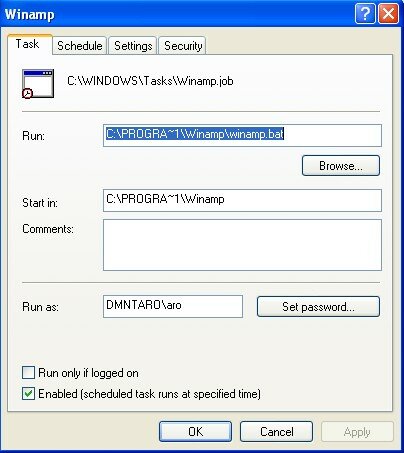
(I advise you to make some tests to see whether the task is carried out correctly)
Here all. And it is already not badly. Do not hesitate to put questions if you have some difficulties in include/understand.
To also note the article How I found courage to rise early to Pierre Morsa, who proposes a complementary solution.
And to finish, I propose réécouter to you a small blow of Coils is All, a good candidate to place in your list of morning listening:


 I subscribed a few days ago with the newsgroup GTDfr.
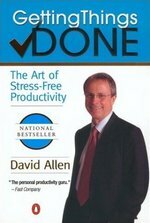 In the field of the personal effectiveness, if it is an essential book, it is well Getting Things Done (GTD) of David Allen.
 Ceroc is a British network of clubs of dance rock'n'roll. Of all the clubs of dance which I knew, it is this one which will have marked me the most. And the broad success which they have on the other side of the channel is amply deserved.
 Ca makes already 4 years that I know this site and thanks to him I passed from the statute of neophyte to, say, enlightened amateur. One of my preferred receipts, that I made discover with some Madagascans, it is the juxtaposed ratatouille. Test-there it is excellent!
 One of my great passions, it is the improvisation with the piano, and I must say that the discovery of the site of Jan Krammer coincides with my best progress on the matter.