Small Folder: the tool of accessibility to do everything
If you follow It flash! regularly, you must know that I am a large fan of the tools of accessibility, this small software which enables you to reach in a wink relevant information. And today, you will discover one of the showpieces of my system of organization: Small Folder.
It is a software for Windows which with the advantage of being free, fast and autonomous. Thus not need to install it, you can carry out it directly starting from a key USB.
Folder Menu is a kind of hybrid between the software Folder Guide, Launchy and Pigeonhole Organizer which we saw previously. Since I discovered it 6 months ago, I make use every day of it to make 3 things primarily:
- To reach the favorite repertories easily
- To launch applications
- To publish documents
We will see in detail how it functions
The access to the favorite repertories
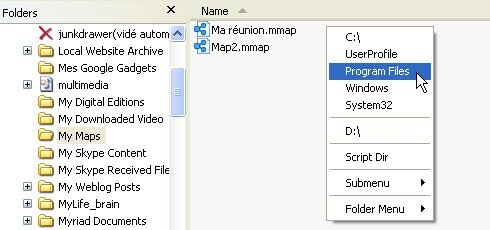
As you can see it in the capture of screen all in top of this article, small Folder is appeared as a menu cliquable. One launches it above a Windows explorer while clicking with the button of the medium of the mouse in the window and it is enough to choose one of the entries of the menu to change repertory. Simple and effective.
Launching of applications
The entries of the menu can also call applications. Thus you can parameterize on the menu all your favorite applications to reach it more easily, like the menu to start a little of Windows.
Edition of documents
Just as one can call applications starting from the menu, one can also call documents, which is very practical for example to take notes regularly.
Parameter setting of small Folder
Small Folder parameter very easily thanks to the Config.ini file:
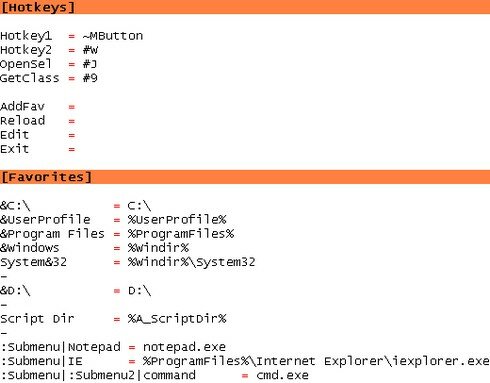
As you see it, there are 2 sections.
-
The first section, [Hotkeys], is used to parameterize the short cuts keyboard. Personally, I use only Hotkey1 and Hotkey2, which are used to indicate the short cuts keyboard to be used to reveal folder small. Here their significance: Hotkey1 = ~MButton: this short cut represents the button of the medium of the mouse. Thus with each time I click with the button of the medium of the mouse in an explorer, small Folder appears to be able to change repertory.
Hotkey2 = #w: this short cut corresponds to Windows+w. The short cut number 2 with the advantage of being activable even apart from the Windows explorer. If the menu appears and that one selected a repertory, Folder small will automatically open a new Windows explorer on the good repertory.
The syntax of the short cuts keyboard is that of the AutoHotKey language. Here the most useful symbols: #=Win! =Alt, ^=Control, +=Shift.
-
The second section, [Favorite], is used to parameterize the entries of the menuChaque line follows following syntax:
name of the entry = value of the entr�eDonchere how to make an entry which points on the repertory C:
&Le root directory of my disc C = C:\The character `& ' is used to indicate a short cut keyboard inside small Folder. Thus in the preceding example, if one is inside small Folder and that L is typed, one obtains the repertory C:
Here another example with this time a program:
Editor of textual file = notepad.exeAnd still another example to open a document:
My races = C:\Documents\mes _courses.txtIt is also possible to parameterize sub-menus, and syntax becomes:
: NomDuSousMenu|name of the entry = value of the entryFor example:
: MesNotes|My races = C:\Documents\mes _courses.txt
Conclusion
Small Folder is one of my best lucky finds to improve ergonomics of Windows. And if you test it there is extremely to bet that you will adopt it.
It should be known that small Folder was written in AutoHotKey language. It is thus open source. And consequently, no matter who can publish it and improve it.
Here the official page of script. But I advise you this achievable version, which is that I use.
Tags: accessibility, easy way, autohotkey, autonomous, keyboard, key USB, ergonomics, exploring Windows, folder, freeware, free, launchy, software, PigeonHole, productivity, short cut, shortened keyboard, repertory, XPIf you liked this article, give him more visibility as a voter for him on Scoopeo:
Similar articles (in theory):
Easy way flash: reach the files frequently used instantaneously
Urgent Get access to frequently used directories
How to see the size of the files in the Windows Explorer?
An easy way to open your files with the good program
A memo practises for all to know in connection with Google






K�vin said,
Wrote one April 23,2008 @ 12:10
finally an equivalent so that one can find on fluxbox or others! Thank you, I will test that quickly!
Gilles said,
Wrote one April 23,2008 @ 17:57
The Help!! I was surprised by my employee reading the blog It flash (very important task). Yes but it was the article on the secret world of the virtuosos of the dredger. To prove my serious in the company, I will try all to include/understand of this new small Folder software. The data-processing flow of lucky finds is impressive, I do not know how you not made.
Argancel said,
Wrote one April 23,2008 @ 18:47
@K�vin: eh yes damage that one is limited to a single manager of windows under Windows.
@Gilles: lol!!! Ca it is an hard blow. It is not any more remained but to surprise it in the same situation;)
For the lucky finds data processing, it is enough to attend the specialized anglophone sites. Lifehacker one of my blogs is preferred in the kind.