How to sort a list of blogs according to their index of Technorati popularity?


In the preceding article, we learned how to serve to us as the XScrape free software, which makes it possible to extract from the data of the Web. We will use it today in a practical example: the sorting of a list of blogs according to their Technorati index.

The index of popularity of a blog, within the meaning of Technorati, corresponds to the number of blogs different which binds towards this blog. It is not inevitably an indication of quality but an indicator of the influence of the blog in the blogosph�re, which can be also related to the capacities of the author to promote his blog. It is thus logical to be interested in it in order to study the methods of the blogueurs who succeeded in making their hole.

To consult the index of Technorati of a blog, anything simpler: it is enough to consult the page http://www.technorati.com/blogs/ {adresse_du_blog_voulu}. Consequently, it seems easy to automate the recovery of the index of Technorati of several blogs thanks to XScrape.

In order to make our company interesting, we will lean on the list of blogs of personal development of Priscilla Palmer (eh yes, I is not wearied any;). The sorting of the list of Priscilla will proceed in 4 distinct phases:

  1. Automatic recovery of the bonds of the blogs of the page of Priscilla Micrometer caliper
  2. Transformation of these bonds into Technorati bonds
  3. Automatic recovery of the Technorati indices of all blogs
  4. Sorting of information obtained

To see the continuation

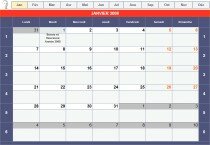
A splendid calendar 2008 with the Excel format

A calendar Excel 2008 with the Excel formatInfofiltrage comes from us concocter a calendar 2008 to the Excel format decorated of macros who allow to seize and to sail easily between the months.


Here is an excellent idea which will undoubtedly enable us to better organize ourselves.

Thank you Infofiltrage!

It is the re-entry: who wants a model of timetable?


It flash! record an impressive audience in this September, amongst other things thanks to the model of timetable to downloadable the Excel format proposed in May:

A precise and aesthetic timetable with the Excel format
The article corresponding is from now on most popular behind the ind�tr�nable ultimate list of the portable sites of applications.

The model suggested previously was based on some 10 minutes time intervals whereas some need 15 minutes intervals. Here thus a second model to meet the need:

Model based on some 15 minutes intervals

The old version is still available here:

Model based on some 10 minutes intervals

If you have some difficulties in adapt the model, do not miss also the 5 essential easy ways under Excel.

5 essential easy ways under Excel

A tutoriel Excel to improve your productivity
Excel belongs to the commercial software of reference that everyone knows.

After a first article which indicated a manner of comparing lists under Excel, I return here at the base with some easy ways that each one must know to be effective.

With the menu:

  • How to jump a line in a cell?
  • To decontaminate the autocorrection
  • Power of special joining
  • How to choose a custom color for your cells?
  • To mask and uncover columns/lines

To see the continuation

A tool of free breakdown service to compare Excel lists

winmerge comparator of texte.jpgThe comparators of text are well-known programmers. They are often integrated in an environment of development and make it possible to manage the versions of the code of the software in the course of programming.

In a more familiar register, you have also the follow-up of the modifications of Word (available in Outil > Suivi modifications) which makes it possible to manage the successive versions of a file .doc.

However, certain editors of document are deprived of tool of comparison. I will quote in particular Excel.

A solution of breakdown service can then be to use a software comparator of text.

It that intervenes the WinMerge utility, which cumulates the good points since it is in particular free, portable and is translated there into French.

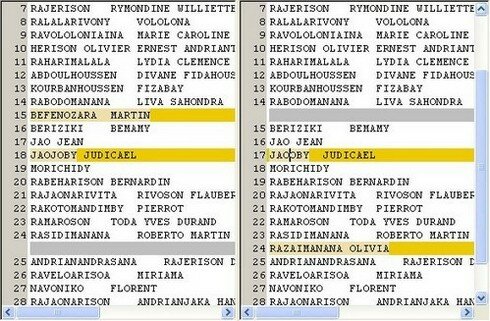
I used it recently to compare two lists under Excel:

to compare 2 Excel files with WinMerge

This has me permi to avoid comparing these lists with the hand and saving a few hours.

If you are interested, here where to find it:

Page of remote loading

Site of the editor

I benefit from this article to launch a small challenge to the readers: if you know a free software specialized to compare two Excel file, I propose to you to share your lucky find, and I will especially publish an article for the occasion with a bond towards your site if you have one of them.

On this, I await your reaction in the comments

UPDATE: I learned thanks to this excellent article: To combine/synchronize Excel sheets which there exists a plugin for WinMerge which makes it possible to compare 2 Excel files directly. I will try it to see

Models: A precise timetable and esthetics in Excel format

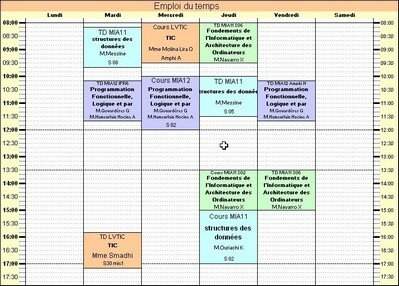
The models are a good way of saving time and of avoiding the usual traps. In this spirit, I propose to you today a model of timetable in Excel format.

A model of malignant timetable for your organization
I conceived it at the university and since, I did not find better. It is a model which combines the advantage of the precision and esthetics, while remaining sober and functional. It is the kind of model which I would have liked to have with the college hold!
To see the continuation