Kit productivity It flash! : experience feedback on 38 software after 1 year of day before
Throughout this year of blogging, I presented various software to you which makes it possible to be better organized, to improve his productivity and to solve small daily worries related to Windows.
I generally tried to focus me on the most useful software based on my daily use of Windows. But nevertheless the desires change, and to measurement of the experiment, one realizes that certain software does not offer the hoped added-value or can be replaced by others, more effective.
I thus decided to offer to you today an assessment concerning all the software that I presented to you during this year, and even in preview certain software of which I did not speak yet but which is worth the turning. For each software, you will find a short description and a comment on the personal use that I make some.
In order to help you to determine the most interesting software, I carefully sorted this list according to the frequency of employment, which is a good indicator of the utility of the software.
This article took much time to me to write, then what would be super, it is that you vote while clicking on the red button Scoopeo, thank you very much!
Caption:
(P) = Portable Application: not need to install it, one can carry out it starting from a key USB
($) = Software commercial
The essential ones
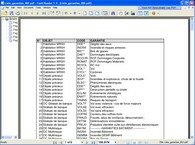 Foxit Reader (P): to open in a wink all your documents pdf
The last versions of Acrobat Reader are so slow that it is very advantageous to change some with the profit of an alternate reader. Foxit Reader is the ideal solution, all your pdf will take care in less time than one should not any to say it.
Foxit Reader is a very stable software and I never had any compatibility issue.
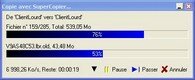 Super To copy [re-examined]: to avoid the r�t�es copies when you transfer from the files under Windows
Super Copier gives you the possibility of taking again a stopped transfer.
It is an invaluable ally when one with the practice to copy/stick great quantities of data like me.
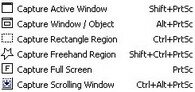 FastStone Captures [re-examined] ($) (P): to capture any part of the screen
FastStone Capture is a terribly effective software for all your captures of screen. It integrates an editor of image in order to annotate your captures before recording them. The last version is paying but you can also download free version 5.3 here.
Very useful to share captures of screen with the colleagues. And also for all that relates to the capture of images for the articles of It flash!
 Launchy [re-examined] (P): allows to launch all your software to the keyboard
With Launchy, it is enough to press a certain short cut keyboard to reveal a dialogue box where you will choose the software with launching while typing the first letters of its name. Launchy automatically indexes all the programs of the menu to start, but you will be able to also specify other repertories with scanner.
With Launchy, one joins again with serenity under Windows: more need to wonder where one put this @#+~~ � icon at nut!!
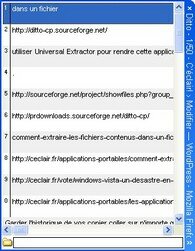 Ditto [re-examined] (P): to preserve the history of copy-sticking under Windows
Ditto is one of my best lucky finds in term of productivity. It makes it possible to memorize all your copies of text in order to you them arise when you need some. It also stores the texts formatted such as the copies of Excel cells for example. This software avoids many swing of window.
I appreciate it particularly when I publish my articles in the digg-like.
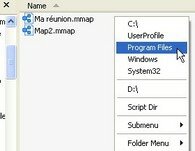 Small Folder [review] (P): to reach very easily the data frequently used
Folder Menu is a menu which one can reveal with the mouse or using a short cut keyboard and which makes it possible to select the desired resource.
I discovered this software 6 months ago and I make use every day of it to make 3 things primarily:
- To reach the favorite repertories easily
- To launch applications
- To publish documents
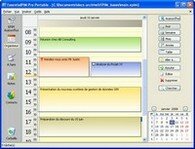 EssentialPIM [re-examined] ($) (P): the rolls of the personal management software of infos
It is about a tool all-in-a which proposes to centralize your personal informations. Your calendar, your lists of things to be made, your notes and your contacts are found thus gathered in a single software. The free version will amply be enough to satisfy the needs for the greatest number.
I have now used it for two years and I of it am very content. So much so that I would fall sick if I lost the data which are stored there!
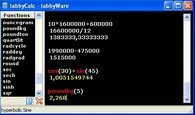 TabbyCalc [re-examined] (P): a light and powerful computer
It is a computer which advantageously replaces the d�suette computer of Windows. Its great force is to preserve the history of calculations even after having closed it and having started again. TabbyCalc integrates also a set of basic functions.
A tool of which I am useful myself very regularly and who avoids me drawing me the hair with the Windows computer.
Current use
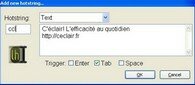 Texter [re-examined] (P): to substitute automatically certain texts which you type with the keyboard
At the daily newspaper, it often sometimes happens to type several times the same thing: a signature of email, an personal address, a complimentary close, an identification number to extension, etc to save this wasted time, the Texter software proposes to you to memorize these ends of text and you them to arise when you need some by typing the corresponding abbreviation simply.
A software which is not essential but which is very pleasant to use. I all the time use it for my signatures of email.
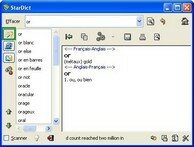 StarDict [re-examined]: to consult in room of the free dictionaries
Perhaps some know that I do not have connection Internet at home. In the absence of being able to consult wikip�dia, I thus use this excellent dictionary offline when I fall on new vocabulary. Very useful also for the languages a little more exotic like Japanese or Chinese.
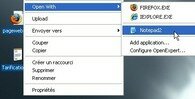 Open Expert [re-examined]: to be able to choose easily with which software one wants to open a file
This software adds entries in the contextual menu which is posted when one clicks with the right button on a document. It makes it possible to memorize various choices of software for the type of document in question.
Small more which makes it possible to gain a few seconds on the opening of the exotic files.
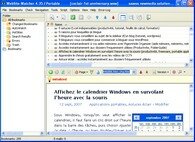 Website Watcher ($) (P): to safeguard locally all the Web pages which interest you
Website Watcher is an excellent software for any person who wants to make day before. It makes it possible to safeguard Web pages individually by keeping the address and the format of origin. You can even update pages safeguarded with the last version on line. Website Watcher will show you where are the differences.
I very often use this software when I make research for my new articles.
 Nifty Windows [re-examined] (P): to handle your Windows windows more effectively
With NiftyWindows, to handle the windows of Windows becomes a true pleasure. It is a small free software which is carried out in background task and allows you to control the majority of the properties of your windows: cut, transparency, attribute always one signal, etc One uses for that the mouse and some judiciously selected keys of the keyboard.
Most useful with this software is the capacity to put the attribute always one signal on any window.
 OpenOffice [re-examined] (P): a good replacement for the Microsoft Office continuation
This office automation continuation is compatible with the usual formats of Microsoft Office: DOC. (Word 2003), Pt (Powerpoint 2003) and XLS (Excel 2003). It supports moreover export as a native with format pdf.
I in particular rather often make use of the software OpenOffice Draw, which constitutes a free good solution to create advanced diagrams.
 Count Down Timer [re-examined] (P): a software timer for booster rocket your productivity
This small software makes it possible to replace the D�marrer button by two buttons clock: that of left posts time and that of right-hand side posts a countdown.
I make use of it occasionally when I have time constraints or to justify me.
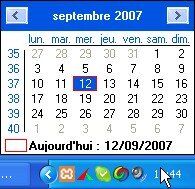 QuickMonth Calendar [re-examined]: to post the Windows calendar by flying over the hour with the mouse
Normally, to post the calendar of Windows, it is necessary to make a double click on the clock in bottom on the right of the screen. With QuickMonth Calendar, a simple passage of the mouse is enough.
What I like with this calendar it is that the calendar posts also the number of the weeks.
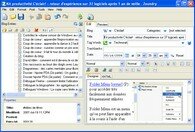 Zoundry : to write and publish articles of blog
Zoundry is a software which makes it possible to write articles of blog locally. Those could be then charged on line to be published later. The advantage of this software is that it has a side bar on the left with the list of all the drafts in progress and all the articles published. It is also light and very stable.
Guess with which software I am writing this article
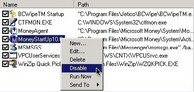 Startup Control Panel [re-examined] (P): to make the sorting of the software launched to starting
It is a recurring question in the users of Windows: how to make to decontaminate the applications launched to starting? Because it is current that software is configured automatically to start without us to require our opinion and thus comes to pollute our daily use of Windows. This small application proposes to you one by one to strip all the undesirable programs which launch out to starting.
One cannot better do in term of simplicity, effectiveness and lightness.
Occasional use
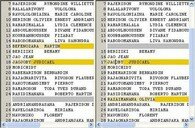 WinMerge [re-examined] (P): to compare text
WinMerge makes it possible to very quickly detect the differences between two textual files. Very useful in particular when one wants to compare lists.
A good tool to be placed always within reach.
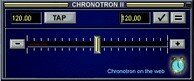 Chronotron [ re-examined]: to slow down/accelerate a music without modifying its tonality and distortion
It is a plugin of winamp which modifies the recording running to slow down it or to accelerate it.
One of the best free solutions. I use it in general to analyze the agreements of a piece of music or to more easily include/understand a recording in foreign language.
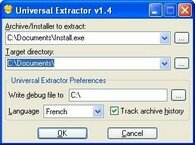 Universal Extractor [re-examined] (P): to extract the files contained in a file from installation
It can be useful to decompress a file of installation for example when one wants to carry out a program starting from a key USB.
It does not decompress all the files of installation. But there remains effective for the majority. I make use of it to make portable certain programs.
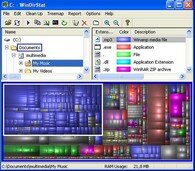 WinDirStat [re-examined]: to easily locate the bulky files of the hard drive
This free utility generates a chart of the files of your hard drive in the form of more or less large boxes according to the memory requirements.
With WinDirStat, to do the housework in its disc forever be also pleasant.
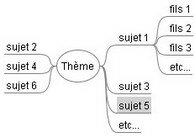 FreeMind [re-examined]: to create diagrams of mental charts.
It is a good way of organizing your ideas at meetings or meetings of brainstorming. Some also use it as todo list to implement the method Getting Things Done.
I often use mental charts FreeMind to obtain a total sight of the ideas which refer to a given subject, or to summarize a book.
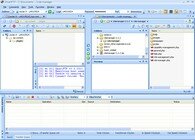 Smart ftp ($): to effectively transfer your files with protocol ftp
I prefer this software of transfer of file in FileZilla because it with the characteristic to check the integrity of the transmitted data. And in more it is free for a noncommercial use.
I like to use this software when I transfer from the critical data. Kind when I update WordPress, the script which makes turn this blog.
 AutoHotKey [re-examined]: to control Windows thanks to your own short cuts keyboard
AutoHotKey is a language of script easy to learn which makes it possible to create short cuts keyboard for all kinds of operations under Windows.
It is good to know AutoHotKey to automate Windows according to its desires.
 Temptation Blocker [re-examined]: to prohibit the access to certain software for a certain given time
It is sometimes quite difficult to be justified to work, especially when temptations are within reach. With Temptation Blocker, you will be able to block the access to certain software for a certain time. It will be always possible to reach it but only after having recopied a long character string given by the software. It is in general sufficiently dissuasive to be reasoned.
Very effective when one dries on a difficult project and that the deadlines start to shorten.
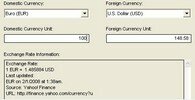 PicoCurrency [re-examined]: to convert the currencies
The most common means to convert currencies is to consult the large gates like Yahoo or MSN. But with all the publicity which appears there, better is worth to directly repatriate the information wanted with a software. It is what PicoCurrency does while being connected to Yahoo Finance. It makes it possible to record locally foreign exchange rates of more than 150 currencies.
Always useful to keep within reach.
Rare use
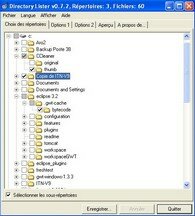 Directory To list [re-examined]: to export the list of the files of a repertory to the format text
This software makes it possible to create listings with the format text of the contents of any repertory.
I very seldom use it but I always keep it with the heat if.
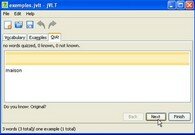 jVLT [review]: to learn from the lists of vocabulary
This small freeware proposes to make you recite the vocabulary of foreign language in a random and automatic way thanks to quiz.
Annoying with this software, it is the seizure of the vocabulary. I do not use it much any more because in this moment, I reduced time that I devote to the training of the languages.
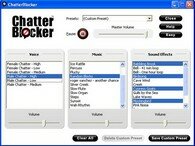 Chatter Blocker [re-examined] ($): to be unaware of ambient din
This software proposes to make inintelligible the discussions of your colleagues by melting their discussions with various audio recordings.
I do not use it any more but in an anecdotic way, when I want to work on the noise of the waves.
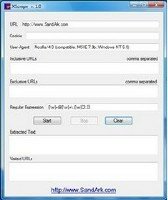 XScrape [re-examined]: to extract from the data starting from the Web
XScrape makes it possible to recover data on the Web starting from a regular simple expression. For example of the emails, Internet addresses, etc
I still keep this software on side if I would need some but it is useful to me only very seldom.
Software of which I stopped being useful to me
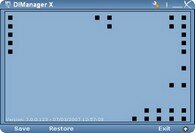 DIManager X [review] (P): to safeguard and restore the position of the icons on the desk
This software is addressed in particular to the people who use their computer for presentations. It enables them to restore the position of the icons after a change of resolution
Although it functions very well and that it is free, I lost the use of this software a little. It should be said that it is a little constraining to let turn such a software in background task whereas one of to the utility only in a specific way, when one makes presentations on an overhead projector.
 PigeonHole Organizer [re-examined] ($) (P): to note memos
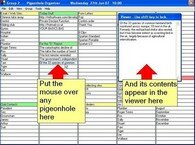
This software makes it possible to seize memos in boxes which one can easily then consult with the passage of the mouse.
I did not want to buy it after the free trial period. What it misses with this software, it is in particular the possibility of storing texts formatted. In addition it makes a little dual employment with Essential PIM (see higher).
 Tudumo [re-examined] ($) (P): to manage its lists of things to be made
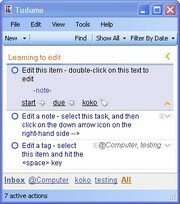
Tudumo is a software which makes it possible to manage its lists of things to be made while following the method Getting Things Done. Its characteristic is to be completely controllable with the keyboard, which makes it possible to save time when it is handled. The filtration system based on the tags and the states is particularly well seen too.
There are several reasons for which I do not use any more this software. On the one hand, it becomes too slow with my taste when many actions are stored. In addition, it does not remain badly of bugs, which sometimes leads to lose the data that one stored there. This contradicted one of the rules most important of the method getting things gives: confidence in its tools of organization. Without counting that remains a commercial software (even if beta release is free).
Blow, I passed by again with the memo pad of Windows to manage my lists of things to be made
 Folder Size [re-examined]: so that the Windows explorer posts the size of the files
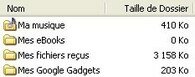
Usually, losqu' one wants to know the size of a file, one clicks above with the right button of the mouse and one clicks on properties. This software makes it possible to remove this stage by calculating the size of the files automatically when the Windows explorer is opened.
I do not use it any more because it consumes too much resources system to my taste and fact dual employment with the WinDirStat software (see more high).
 FolderGuide [re-examined]: to reach easily the favorite files in the windows of Windows explorer
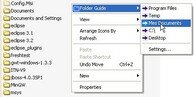
With FolderGuide, plus need to seek during three fifteen minutes when our repertories of work passed. It is enough to click with the right button of the mouse in a window of Windows explorer to reach the list of the favorite repertories easily.
This software is a pure wonder. My team of developers still abundantly uses it with the job. But since I discovered Folder Menu (see higher), I do not have of it any more the utility.
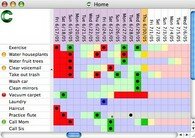 Sciral Consistency [re-examined] ($): to supervise the realization of the recurring tasks
This software is appeared as an instrument panel where one notches each day the recurring tasks which one carried out.
I do not use any more this software because the free version is attached with 2 instrument panels of 5 tasks each one. But it is a software very well done and I do not exclude to return a day there, to even buy the licence.
Note: one had decided with the webmaster infofiltrage to create a free equivalent in AutoHotKey language, but finally the project fell a little to the oubliettes fault from time.
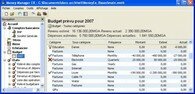 Money Ex Manager [re-examined] (P): to manage its finances
Money Manager Ex is a personal accounting package which makes it possible to manage its finances very easily.
To tell the truth, I realized that the management of my finances is for the moment so simple that it does not justify time spent to seize each expenditure and re-entry of money in this software. But I do not exclude to return a day there.
Here all. Of what to occupy you a few times, not?
If you want to suggest other good software, do not hesitate with us to make share in the comments of it!
Tags: portable application, effectiveness, freeware, Getting Things Give, free, GTD, software, productivity, productivity, to organize itself, utility, Windows, XPIf you liked this article, give him more visibility as a voter for him on Scoopeo:
Similar articles (in theory):
Temptation blocker: a good remedy against the procrastination
How to keep an eye on what Google reserves to us?
There is one year on It flash! - September 2007
A blog moreover on the productivity and the personal development
To easily find the equivalent free of a software commercial






Laurent Brixius said,
Wrote one May 16,2008 @ 21:45
To avoid falling sick if you would lose your data stored with Essential PIM, you should evaluate the SyncBackSE software.
It is about a software making it possible to synchronize or safeguard repertories located on 2 different computers. It also allows the use of http://FTP address.
I daily use it for the autosaving of my EssentialPIM files on the lodging of my Web site.
I also use the software software The Rename when I must change the name or the extension of several files at the same time. Very powerful but to handle with precaution to avoid any catastrophe.
thibault said,
Wrote one May 16,2008 @ 21:57
With when a passage to linux?
Jean-Louis said,
Wrote one May 16,2008 @ 22:08
You known as: EssentialPIM: the rolls of the personal management software of infos. For my part I use Kplan. It is much less pretty certainly, but personally I find it more complete. I like much his 3 lives (perso, pro, ESA). And its tool the chronodatrice.
David touched said,
Wrote one May 16,2008 @ 22:37
there has tricks sympas!
Imintar said,
Wrote one May 16,2008 @ 22:54
What to say? Thank you.
For Folder Size, it is really to disadvise. If Microsoft did not add the function cuts file in the explorer of Windows, it is which the system really made row.
agatzebluz said,
Wrote one May 17,2008 @ 9:05
Thank you for this titanic task.
Ca already allowed me to save time at the office.
If not for the deceleration of music you can test Best practice which is really very complete. One can regulate speed very finely and the pitch and it functions with Cd, wav or mp3 (and can be even of other formats).
http://www.xs4all.nl/~mp2004/bp/
I vote continuation on scoopeo.
Good continuation.
Raf said,
Wrote one May 17,2008 @ 12:22
<>
Personally, I use simply the system of note of essentialPIM That clearly made douvle employment with the memo pad
olive-tree said,
Wrote one May 17,2008 @ 13:32
With when a passage to Mac OS X?
Number of thing easier, are conceived better and more intuitive on Mac OS X than on the other operating systems. Moreover, the majority of the applications is integrated well between it thanks to the technology of Mac OS X like iCal or the Address book. All these advantages improve the productivity largely.
Didier Bretin said,
Wrote one May 18,2008 @ 9:41
Beautiful list that here. I finely test continuation folder. In connection with Launchy, which version do you use? Isn't version 2 very slow?
Fred de ConseilsMarketing.fr said,
Wrote one May 18,2008 @ 16:54
Whaouuaaa Superb list!!!
I will test poster a bond on my blog this week!
A must; D
With +
FRED
Argancel said,
Wrote one May 18,2008 @ 22:52
@Thibault @Olivier: that depend especially on my job and for the moment, Windows is obligatory.
@Jean-Louis: I did not know Kplan, it will be necessary that I test it.
@agatzeblu: yes, I heard of Best practice also but I did not test it yet
@Imintar: eh yes, therefore I do not use any more folder size.
@Didier Bretin: I still use version 1.25 of Launchy which amply satisfies me for the moment. I did not test version 2 yet
@Fred: Thank you!
Argancel said,
Wrote one May 18,2008 @ 23:32
@Laurent Brixius: Seen well for SyncBackSE! I also know it and I also use it to safeguard my base Essential PIM. Moreover I could have included it in the list of software.
For the renommor, I acknowledge on rather seldom the occasion to make this kind of handling.
Ramenos said,
Wrote one May 19,2008 @ 17:44
No the bowl, I am under Mac. But at the time or I was still under Windows, I used indeed some of this software.
olive-tree said,
Wrote one May 19,2008 @ 17:51
@Ramenos > I would say Blow of bowl rather, I am under Mac.. Basic truce of fanaticism, of the equivalents exist for Mac OS X! It is enough to seek a little.
(you can possibly contact me if you do not find your happiness, I badly do not use small utilities similar to those of this list under L�opard)
Luc said,
Wrote one May 23,2008 @ 11:03
Hello
To replace tudumo see this little program which is in freer and free:
it is about task coach:
http://freewares-tutos.blogspot.com/2008/05/task-coach-un-gestionnaire-de-tches.html
if not know goods tutos to learn autohotkey, I began a program project in autohotkey but I am blocked a little because jai not found much a tuto in French damage, Cr I like much the syntax of autohotkey, that made a long time that I sought such a languate.
inon thank you for this list which contains some merveilels of which some one that I use already.
Laurent Brixius said,
Wrote one May 24,2008 @ 21:44
Still a small software which saves me enormously time when I seek a file some share on one of my backups/files external: WhereIsIt.
http://www.whereisit-soft.com/
In 2 minutes, I know about which support (external CD/DVD/disque or intern,) the file is which I seek.
Laurent Brixius said,
Wrote one May 24,2008 @ 21:56
@Jean-Louis > I have used KPLAN during some month (2005-2006) but I it have finally given up (for a lack of possibilities of export if my memories are good), well before using EssentialPIM. I appreciated his management of the documents particularly (but I found well better since).
With EssentialPIM, you can configure categories as much that you wish it or almost. That must correspond to the lives of KPLAN.
One as of its principal advantages for a professional application is the availability of a version network which makes it possible to divide a diary, contacts, tasks or notes with all the collaborators of the office while having levels of protected accesses. It is not, to my knowledge, available with KPLAN.
KPLAN remains however a personal organisor of great value in my eyes and I suppose that it evolved/moved well since 2005.
Jean-Paul said,
Wrote one July 15,2008 @ 15:13
Beautiful list of software to improve the productivity.
I knew of it already a certain number by the liberkey project (www.liberkey.com) which brings in addition to the facility to work in displacement: a simple rather fast key USB and one has (according to the versions) 30 to 214 free software and portables to work since any computer functioning under Windows (2000 in Vista).
Those present in the liberkey: FastStoneCapture, EssentialPIM, OpenOffice, WinMerge,
UniversalExtractor, WinDirStat, AutoHotKey
Others were in the previous models like FoxitReader and were replaced by equivalent software or more powerful.
An internal software of association of files to the project is integrated it is KeyFileAssoc which can associate in a temporary way the extensions to the software of the liberkey then to give Windows associations then by defect when the liberkey is left.
JP4U
EricOweb said,
Wrote one September 4,2008 @ 23:53
A beautiful reference of useful software, and for the free majority. Added to useful comments, the reference takes even more value.
Excel!
It should be noted that recently, SmartFtp is not free any more. Damage, because it was quite practical.
I chose FileZilla 3.12 in the place, a less complete chouilla, but it conservce a very good functionality.
sellam said,
Wrote one December 22,2008 @ 13:04
I would like to improve my quality of reading